After working very hard on multiple versions of TeamMentor (TM 2.0, 3.0, 3.5 and 4.0), the time has finally come for me to let TM go, and move my Application Security efforts in other directions.
The last 4 years at SI have been an amazing experience and I've learned a lot.
Not only I increased my development skills (.NET, Java, Eclipse, Node, Javascript), I finally understood what TDD is all about and where security fits within the SDLC.
I really want to thank Ed and Jason for the opportunity, and the amazing worldwide TM development team (Serge, Michael, Lucy, Roman, Salle) for making TM 4.0 a reality.
I'm sure mine and SI paths will meet again. In fact I'm still contributing a couple bug fixes to TM, so I'm still around :)
Good luck to SI and all the team
PS: In case you are curious, I'm now helping UK companies to set up their Application Security Programmes (i.e. I'm a part-time 'Head of Application Security')
Showing posts with label TeamMentor. Show all posts
Showing posts with label TeamMentor. Show all posts
Monday, 2 November 2015
Saturday, 17 January 2015
Thinking and coding in Graphs, some screenshots of last 6 months
In the past 6 months I have been working on TeamMentor 4.0 (new version) which is based on a graph database and written in node.
I was cleaning up my desktop today and found the images below which represent the multiple experiments I have been doing in ways to visualise the content data we have.
This is quite a raw dump, but if you would like some descriptions about what each one means (and believe me that each one as nice story behind), let me know and I'll write more about them
I was cleaning up my desktop today and found the images below which represent the multiple experiments I have been doing in ways to visualise the content data we have.
This is quite a raw dump, but if you would like some descriptions about what each one means (and believe me that each one as nice story behind), let me know and I'll write more about them


Thursday, 8 January 2015
Achieving 98% Code Coverage, by running mocha Web Automation Tests in Chrome (from WebStorm)
Here is what the high-productive Node + Chrome TDD test environment (that I use every day) looks like, when executing the TM_4_0_QA UI Automation tests
This is the setup that allows me to have 98% to 100% code coverage (see The quest for 100% Code Coverage, the 96cc idea and 'apps with low CC must be insure' for more details)
The Chrome window on the right is powered by O2 Platform's NWR project
The use of WebStorm is not required for the tests to run, since the same result can be achieved by running npm test from the console.
Video: Running mocha Web Automation Tests in Chrome (from WebStorm)
This is the setup that allows me to have 98% to 100% code coverage (see The quest for 100% Code Coverage, the 96cc idea and 'apps with low CC must be insure' for more details)
The Chrome window on the right is powered by O2 Platform's NWR project
The use of WebStorm is not required for the tests to run, since the same result can be achieved by running npm test from the console.
Video: Running mocha Web Automation Tests in Chrome (from WebStorm)
Thursday, 1 January 2015
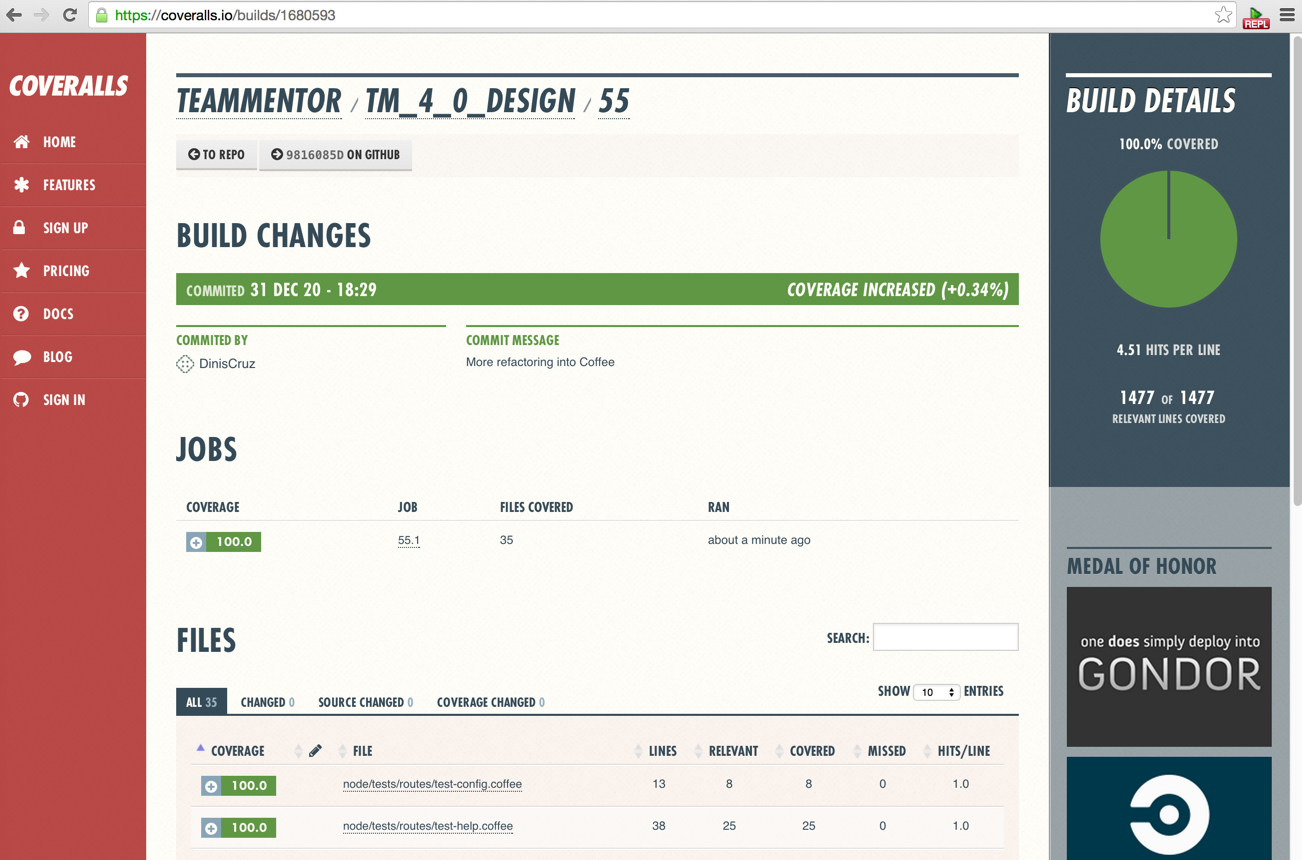
The quest for 100% Code Coverage, the 96cc idea and 'apps with low CC must be insure'
I've spent the last day improving the UnitTest coverage of TM_4_0_Design and since this codebase as been developed with a nice TDD workflow, after a bit of code-cleanup and refactoring I was able to achieve 100% Code Coverage :)
Tuesday, 9 December 2014
Node + Chrome TDD test environment (finally got it to work)
In the past 3 months I've spent countless hours (and a good number of weekends) trying to figure out a way to better TDD node and JS, and finally I got it to work:

Monday, 4 August 2014
The 4 components of the new TeamMentor 4.0 design (and IE support)
Thinking at the new TeamMentor 4.0 design from a technical, implementation and shipping point of view, there are 4 kinda-separate parts of the new design.
1) the 4.0 look and feel + basic use (simple navigation, basic search and article viewing)
2) the 4.0 ' search driven functionality'
3) the 4.0 design with full article (and library / metadata) editing capabilities
4) the 4.0 design on TBot/Admin features
For the 1st one, we should aim to have a full-backwards compatible version of TM. Note that this version would also be the 'TM Mobile' version (i.e. the default way to consume TM on a mobile, or in a small window space like what we get inside an IDE plugin (bootstrap has a 'responsive, mobile first fluid grid system' which makes this easier))
For the 2nd, this is where the main UE and UI thinking/experimentation needs to occur.
Search feedback loop and other TeamMentor 4.0 Search related topics
While thinking and researching how to do the search on TeamMentor 4.0 (next version of TM), one of the key workflows that I kept coming back into are:
- need to have feedback loop on the search results (this is really what makes Google Google), which can be be captured:
- explicitly: via the user clicking on the + or - sign close to each search)
- implicitly: via detecting which search result the user clicks (and which rank that search had)
- by mapping: where the user (or TM admin/editor) is able to provide feedback on a particular search. For example saying that the search results for 'X' should be the search results for 'Y'
- need to learn: this is connected to the feedback loop mentioned above and is based on the idea that the TM search results should become better with time
- need to start collecting data as soon as possible (ideally leveraging the current hundreds or thousands of Application security searches SI employees already do every day
- need to explain how we calculated a particular search result (of course that this needs to be hidden to normal users (unless they want it to), but we really need to show TM Editors/Admins the logic behind the search formula (and data) used to create those results, and reach the conclusion that 'article X' should be shown before 'article Y' (or folder/view/category 'X' should be shown before folder/view/category 'y')
- Provide links to other search engines and application security websites (like google, StackOverflow, OWASP, Wikipedia, etc...). this would allow us to make the case 'first search in TM and then go into Google' (I think google used to do this with other search engines (in a long distant past)):
- If fact, this could also allow use to 'fix' Google queries, since we could say "Hey you searched for XSS but what you probably want (from google) is 'How to fix XSS vulnerabilities in .NET" (assuming we had detected that that user was looking at .NET results
- Provide recommended searches based on past searches: the typical "users that searched/bought this item also searched/bought this ones"
Friday, 18 July 2014
Using TDD, how I found that NUnit TestFixtureSetUp and TestFixtureTearDown (from base classes) are not called when a Constructor exists (in the main class)
Just hit an interesting issue which I'm sure there is a good explanation for, but It caught me off guard.
I was working on this NUnit test called Test_Tbot_User_View
I was working on this NUnit test called Test_Tbot_User_View
Wednesday, 16 July 2014
From NUnit AppDomain, accessing properties and invoking methods on 'Serializable MarshalByRefObject TeamMentor objects' (hosted on Cassini's AppDomain)
After How fast do the 'NUnit-Cassini-driven' tests execute (on a full TM instance) it was time to start accessing internal TeamMentor objects from the NUnit AppDomain.
The main change I did was to add the [Serializable] and the MarshalByRefObject to the TeamMentor (TM) objects that I want to consume (i.e. access data and invoke methods) from NUnit tests.
Here is an example of what it looks like in one of the main TM's data classes:
The main change I did was to add the [Serializable] and the MarshalByRefObject to the TeamMentor (TM) objects that I want to consume (i.e. access data and invoke methods) from NUnit tests.
Here is an example of what it looks like in one of the main TM's data classes:
Tuesday, 15 July 2014
How fast do the 'NUnit-Cassini-driven' tests execute (on a full TM instance)
A question I received after posting The moment I was able to serialize objects across an ASP.NET AppDomain and an NUnit AppDomain was 'Ok, that is is interesting, but how fast is it?'
That is actually one of the 'THE' key questions, since if we want to be able to create NUnit tests that use newly created Cassini-driven websites (i.e. a new Cassini server per test or test class) they have to be fast.
Ok, so how 'fast' is fast?
Well, in my book, that is either less than 1 second (for quick tests) or 10 seconds (for more complex setups).
More than that, and it is not practical to run those tests from NCrunch (or even manually via Resharper/NUnit-GUIs)
The good news is that (as you can see below), I was able to execute an 'NUnit-Cassini-driven' test in:
That is actually one of the 'THE' key questions, since if we want to be able to create NUnit tests that use newly created Cassini-driven websites (i.e. a new Cassini server per test or test class) they have to be fast.
Ok, so how 'fast' is fast?
Well, in my book, that is either less than 1 second (for quick tests) or 10 seconds (for more complex setups).
More than that, and it is not practical to run those tests from NCrunch (or even manually via Resharper/NUnit-GUIs)
The good news is that (as you can see below), I was able to execute an 'NUnit-Cassini-driven' test in:
- 6 sec: via NCrunch (consuming a TM instance with 0 libraries)
- 7 sec: via ReSharper (consuming a TM instance with 3 libraries)
The moment I was able to serialize objects across an ASP.NET AppDomain and an NUnit AppDomain
As you can see at the end of How to debug an Cassini hosted website and the UnitTest that uses WatiN to automate that hosted website, although I was now able to start cassini in the current NUnit process, I was still not able to have direct/native access to the running objects of that website.
Basically what I wanted was to be able to access programatically the live TeamMentor (TM) objects from an NUnit test (note that both are running on separate AppDomains).
Not only this would make some of the tests I want to write possible, it would allow me to much faster setup specific test environments (for example cases when I need a number of users to already exist in TM).
The key problem is that after starting the 'TM website running inside Cassini, triggered from the NUnit test' I was left with two AppDomains:
Basically what I wanted was to be able to access programatically the live TeamMentor (TM) objects from an NUnit test (note that both are running on separate AppDomains).
Not only this would make some of the tests I want to write possible, it would allow me to much faster setup specific test environments (for example cases when I need a number of users to already exist in TM).
The key problem is that after starting the 'TM website running inside Cassini, triggered from the NUnit test' I was left with two AppDomains:
- The NUnit AppDomain running the NUnit Test and the Cassini Server
- The Cassini AppDomain running the TM website
In practice what I wanted to do is to be able to access and edit one of TM objects (for example TeamMentor.Schemas.TM_Config from the NUnit test).
And that is exactly what I was able to do :)
And that is exactly what I was able to do :)
Friday, 11 July 2014
How to debug an Cassini hosted website and the UnitTest that uses WatiN to automate that hosted website
One of the cool new capabilities that I'm using when writing QA Automation scripts for the latest version of TeamMentor, is the https://www.nuget.org/packages/FluentSharp.CassiniDev which allows the execution of an an 'in memory' version of Cassini (hosting the full TeamMentor website) in the same process as the Unit Test driving the IE automation of the hosted website (using FluentSharp.WatiN)
In practice, what this means is that the UnitTests are being executed in the same process as the main TeamMentor Website. This something that I have been wanting to have for ages, and the key capability I gained from it was the ability to debug both live website and UnitTest in the same session.
Lets set it in action.
In practice, what this means is that the UnitTests are being executed in the same process as the main TeamMentor Website. This something that I have been wanting to have for ages, and the key capability I gained from it was the ability to debug both live website and UnitTest in the same session.
Lets set it in action.
Using WatiN and Embedded Cassini to run complex TeamMentor Automation (Create and Delete an Library)
Here is an QA Automation script I created today which performs a number of Integration Tests on the new version of TeamMentor.
These are the main moving parts (of the QA Environment and script):
These are the main moving parts (of the QA Environment and script):
- Using an embedded WatiN IE window inside an WinForms window to drive Cassini hosting an .NET 4.5 website (this 'popupWindow' was actually opened from a UnitTest :) )
- Driving the IE browser using a number of FluentSharp ExtensionMethods
- Number of waits for links to exist (needed due to the Ajax nature of TeamMentor)
- When needed, directly query javascript variables ('window.TM.WebServices.Data.AllLibraries.length') and invoke core TM Javascript APIs ('window.TM.Gui.LibraryTree.remove_Library_from_Database')
- Use of Lambda methods to create an basic TM API (login, logout, open xyz page, trigger complex workflows, etc...)
Here is what this test QA environment looks like:
Thursday, 8 May 2014
Watching google crawl TeamMentor site (10m after blog post)
This is really interesting and telling of Google's crawling speed and updates.
I posted What are the main TeamMentor use cases? (and "Don't copy and paste from Google, copy and paste from TeamMentor") 10 minutes ago, and while looking at the new 'TM 3.4.1 real-time TeamMentor Activity' viewer, I noticed a number of 404s:
I posted What are the main TeamMentor use cases? (and "Don't copy and paste from Google, copy and paste from TeamMentor") 10 minutes ago, and while looking at the new 'TM 3.4.1 real-time TeamMentor Activity' viewer, I noticed a number of 404s:
What are the main TeamMentor use cases? (and "Don't copy and paste from Google, copy and paste from TeamMentor")
(Earlier today I was asked "What are the most compelling use cases for TeamMentor" and here is my answer:)
There are a couple pages in SI's website that cover some of the common use cases : see here and here
I think the main use-case is in 'answering Developers/Testers questions'
I like to think of the workflow as in "Don't copy and paste from Google, copy and paste from TeamMentor"
For example take a look at the .NET 4.0 library (direct link here) , if you filter by 'Code Example'
Friday, 11 April 2014
From Azure to Firebase: Could not establish trust relationship for the SSL/TLS secure channel.
UPDATE (16/Apr/2014): Following a lead from the Firebase Support it looks like the problem could be inside Azure for all SSL, since "https://www.google.pt".GET(); also doesn't work.
Just had a really weird scenario happen to me in the last couple hours, which could be somebody hacking Azure (but I think there is a more benign explanation)
The new version of TeamMentor (currently in 3.4.1 RC0) has a really cool real-time log/activity log viewer which uses Firebase to push data and pull data (from a 'configured TM server' into 'multiple browser-based viewers').
For a while all was good (both locally and in Azure), but in the last couple hours, I noticed that the 'data push' stopped working (i.e. my test version of TM running on Azure was not pushing Activities, DebugMsg and RequestUrls into the assigned Firebase account).
Here is what the viewer looks like (with new messages not being received):
Just had a really weird scenario happen to me in the last couple hours, which could be somebody hacking Azure (but I think there is a more benign explanation)
The new version of TeamMentor (currently in 3.4.1 RC0) has a really cool real-time log/activity log viewer which uses Firebase to push data and pull data (from a 'configured TM server' into 'multiple browser-based viewers').
For a while all was good (both locally and in Azure), but in the last couple hours, I noticed that the 'data push' stopped working (i.e. my test version of TM running on Azure was not pushing Activities, DebugMsg and RequestUrls into the assigned Firebase account).
Here is what the viewer looks like (with new messages not being received):
Friday, 14 March 2014
Interesting validation problem on new user's email, caused by a TLD in caps (and using NCrunch to test it)
While working on this issue and improving the Unit Test coverage of TeamMentor's user creation code, I noticed that:
-
a) these emails worked:
abc@def.ghi , ABC@def.ghi , abc@EDF.ghib) but these ones didn't:
abc@def.Ghi , abc@def.gHi , abc@def.GHI
Saturday, 1 March 2014
C# example of using Firebase REST API
Once I got my head around how Firebase worked (see here multiple Firebase related posts), my next step was to figure out a way to send data to it from C#, namely from TeamMentor.
To try it out, I used the Web C# REPL that is part of TeamMentor's admin section (which gives me a great interactive environment to quickly test new APIs).
To try it out, I used the Web C# REPL that is part of TeamMentor's admin section (which gives me a great interactive environment to quickly test new APIs).
Friday, 28 February 2014
A really SIMPLE and clean AngularJS+Firebase example
As seen on the First PoC of sending TeamMentor's server-side request URLS to Firebase (and seeing it in realtime in an AngularJS page) I created a Simple AngularJS website which I'm very happy with (and I mean Simple with a capital S).
The main reason I really like the solution shown below, is because it represents a number of really nice, clean and Simple solutions for common (complex) problems that exist while developing in Javascript.
The created application is an:
The main reason I really like the solution shown below, is because it represents a number of really nice, clean and Simple solutions for common (complex) problems that exist while developing in Javascript.
The created application is an:
- AngularJS real-time viewer for HTTP requests,
- ... made to an ASP.NET web application (TeamMentor),
- ... captured by an custom C# HttpHandler filter,
- ... submitted to Firebase using its REST API and
- ... pushed back to the AngularJS app using open HTML 5 WebSockets.
Thursday, 27 February 2014
First PoC of sending TeamMentor's server-side request URLS to Firebase (and seeing it in realtime in an AngularJS page)
After getting my head around how Firebase works (see Using Firebase to sync data with a webpage (via Javascript, REST and Firebase Admin panel) and Trying our Firebase (Beta) hosting solution and good example of Firebase Security rules), I really wanted to see how it could work on a key feature that I've been wanting to add to TeamMentor for ages: Realtime viewing of traffic and logs
And it worked :)
This is really exciting!!! (can you tell :) ), specially since I can see so many great uses of this type of technique and technology in TeamMentor (for example it will allow for much better understanding on how the content is used, and for better collaboration between its readers (and authors))
And it worked :)
This is really exciting!!! (can you tell :) ), specially since I can see so many great uses of this type of technique and technology in TeamMentor (for example it will allow for much better understanding on how the content is used, and for better collaboration between its readers (and authors))
Subscribe to:
Posts (Atom)